
Stones and rocks are robust materials. Crafting designs on them is not child’s play. But engraving on stone is not a new job. People have been doing it for thousands of years with hammers and chisels.
However, there is a new method in the industry. Laser introduction has already shaken the market with accuracy, speed, and efficiency. But the major question is— how to engrave rocks and stones with a laser?
Today, we will answer all your questions and provide a step-by-step guide on engraving rocks.
Is stone engraving possible?
Yes. 100%. You can engrave rocks and stones using the right approach.
There are two methods.
- Traditional method. It is an obsolete method because of the effort. Most people used to craft designs on rocks and stones with hammers and chisels. It is time-consuming and takes much effort.
- Laser engraving. Engraving on rocks and stones is pretty easy with the laser. A laser with a focused beam produces a clean and glamorous engraving. Moreover, it does not consume much time. Also, you can reduce the chances of humans.
Sandstone engraving with a laser is the hot topic. There are many options for crafting designs.
What are the common uses of laser-engraved stone?
Using the laser engraving machine to make the stone would be great. It looks stylish and prettier.
Here are a few more pros.
- Memorial stones and headstones. Permanent inscriptions and portraits produce an excellent image.
- Photo engravings. Detailed grayscale reproductions of images on the stone look amazing.
- Decorative tiles and wall art. Customized patterns or text for interiors make it more elegant.
- Slate coasters and trivets: Personalized kitchen and dining accessories have stylish designs crafted with a laser.
- River rock art. Small stones engraved with quotes or symbols are pretty common now. It is because of the people’s interest in such products.
- Architectural signage. You can add house numbers, directional signs, and nameplates. It looks more classy than other options.
- 3D engravings. Layered or multi-depth designs for artistic reliefs are an innovation in the market.
Best Types of Stones for Laser Engraving

If you are wondering about laser engraving on rocks and stones, it is all about selection. Some stones have an excellent surface for crafting a design. In comparison, another one can be good but inefficient for the laser engraving stone.
Stone engravings are suitable for the following types.
Granit
Granite is one of the strongest candidates for stone engraving. It is because of the excellent surface and impactful results. The dark color gives a shiny finish with a white color.
Here are a few more features.
- Very durable and weather-resistant
- Requires higher laser power
- Produces crisp, detailed images
Marmor
Have you heard of marble? Custom sandstone coasters can craft elegant designs. Marble has a smooth surface and excellent finish. However, you need to add the color to elevate its contrasts.
A few prominent features are:
- Great for indoor décor and art pieces
- A softer surface offers faster engraving.
- May need color filling for contrast
Slate
After granite and marble, you can find the third-most popular material. It is the slate. It has an outer contrast layer that looks amazing with the light color beneath.
The following features make it an optimal choice.
- Engraves quickly with good detail
- Ideal for coasters, plaques, and signs
- Requires minimal post-processing
Other stones
There are a variety of other stones out there that make it more effective for engraving. Limestone, sandstone, basalt, and quartzite are good options. But you can’t expect an excellent finish compared to the above types.
How do you choose the right stone for laser engraving?
Not all stone types are the best. Only a few of the abovementioned stand out among all the types. However, we have added a few tips and considerations. Go for them.
Best stones to select
You should choose only stones for engraving that have the following features.
- A solid surface with the least porous materials.
- Excellent contrast surface with inner smooth engraving options.
- Compatible with the engraving with the laser
- Must look premium once you have engraved
The best options for the stone engraving include:
- Granit
- Marmor
- Slate
- Pebbles
- Basalt
Stones to avoid
There are a few types of stones you should avoid. This is because their nature absorbs too much heat and dissipates it. It can cause poor engraving and cause big trouble.
Here are those types of stones.
- Sandstone. They scatter the laser beam, resulting in uneven textures and blurry designs.
- Quartz and Highly Reflective Stones: Their shiny surfaces can deflect the beam, reducing marking depth and potentially harming the laser head.
Tips to select
Do you want to know how you should select the best stone types?
- Uniform texture. Select stones with minimal veins or cracks to avoid irregular engravings. It can stabilize the engraving and make it look excellent.
- Dark color preference. Darker stones tend to show higher contrast with light engravings. The outer surface must be dark, no matter whether the inner surface is bright.
- Test samples. Before you make your final selection, go for the sample assessment. Conduct small engraving trials to fine-tune settings for optimal results.
Types of lasers used for stone engraving
Different lasers offer unique and high-quality engraving on rocks and stones. Here are three main categories you should know.
CO₂-Laser
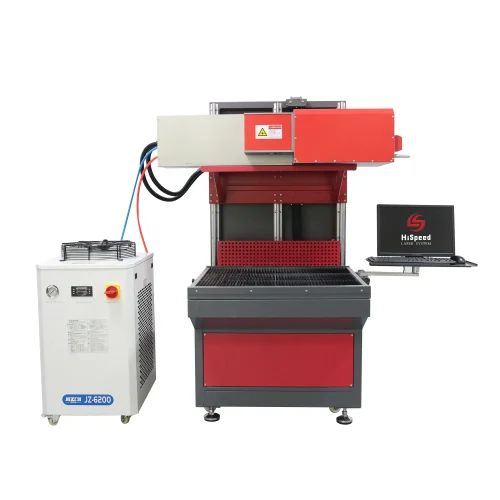
CO₂ Lasers are one of the most creative options. They emit infrared radiation. This radiation makes an excellent design on the stones.
The pros include:
- Ideal for materials like granite, marble, slate, and basalt.
- Large working areas allow engraving of big plaques or tiles.
- Produces smooth, detailed, and high-contrast markings.
The cons are:
- CO₂ Lasers can only engrave the stone and not cut through the surface. If you are thinking of cutting and engraving, this laser is not a suitable choice.
Faserlaser
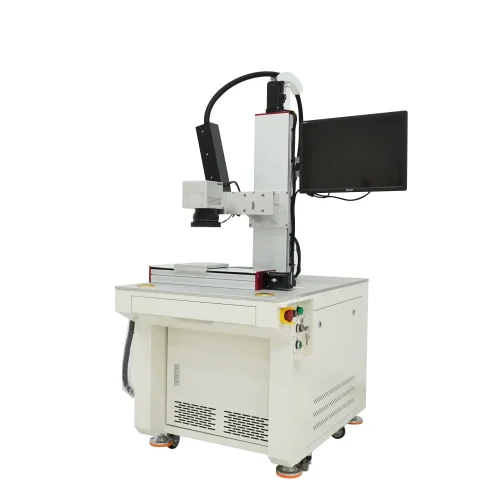
Fiber lasers use the fiber optic systems to gather the laser beams and craft a design. They handle certain stone types, such as dark and dense ones.
Here are the pros.
- Provides excellent precision for small-scale or intricate designs.
- Engraves dense, polished stones with minimal surface damage.
The cons include:
- It has less contrast than CO₂ lasers. They are not ideal for large surfaces as they work on smaller marking areas.
Diode laser
Diode lasers are also one of the best options. But they are good for the smaller surfaces and offer affordable prices.
The pros include:
- Lightweight, portable, and budget-friendly.
- Perfect for engraving pebbles, tiles, or small decorative items.
The cons are:
- Limited engraving depth and speed.
- Results can vary on dense or uneven surfaces.
Step-by-step Guide to laser-engraved rocks
Laser Engraving Stone and rocks is not a big hassle if you have the right tools. Here are a few steps to make laser engraving on rocks.
Step 1: Select and Prepare Stone
First of all, you have to prepare the surface. There should be no dust. Here are a few options to clean the surface.
- Wipe the surface with a damp cloth
- Inspect for cracks or color inconsistencies
- Apply masking tape around the engraving area
Step 2: Design Artwork
Do you have a design ready? A digital design is necessary for the laser to act upon and work on the surface. Here is how you can ensure it.
- Prepare your design using programs like CorelDRAW or RDWorks.
- Convert the image to grayscale for better control.
- Adjust contrast and brightness to highlight finer details.
- Use resolutions between 300–600 DPI.
Step 3: Set up the Laser Machine
The laser machine works according to the design you have prepared. Once you have it, go ahead and align all laser components and do the following tasks.
- Place the stone flat on the machine bed.
- Adjust the laser focus height carefully to match the stone’s surface.
- For irregular or curved rocks, use a jig to stabilize them.
Step 4: Configure laser parameters
Set up the Laser settings for better results. Here is what you should do.
- Start with 80–100% for hard stones like granite.
- Set speed between 100–200 mm/s for controlled depth and definition.
- Frequency should be 500–1000 Hz for clear, crisp lines.
- Engrave stones based on your digital images and shapes.
Step 5: Cleaning and Finishing
Once you have engraved it, it is time to clean and finish it. Here are the following cleaning and finishing tips.
- Brush off any remaining dust or residue with a soft cloth.
- Rinse the surface gently with water and let it dry completely.
- Apply stone polish, wax, or color fill to make it more elegant.
- For outdoor items, consider sealing the stone for added durability.
Schlussfolgerung
Crafting designs on rocks and stones is a timeless beauty. Laser engraving on rocks and stones has made it even more worthy. The accuracy and speed without any errors can create complex patterns. But you should have the correct type of lasers.
Where do you get premium-quality laser engraving machines? Look no further, as Sendo-sensor is here with the quality approach and premium laser machines. You can use the CO2 lasers on rocks and stones to create your favorite designs. Check out more collections on our official website.