
Laser engraving is one of the most accurate and favored methods for creating beautiful designs. Most of the time, you only hear about laser engraving on flat surfaces. However, laser engraving is also possible for curved surfaces. That’s where many beginners get confused and ask: How to laser engrave a curved surface?
No doubt, laser engraving for curved surfaces is not as simple as for flat surfaces. It requires some extra tools and adjustments for accurate results. If you want to laser engrave a curved surface, you need not worry! In this guide, I will explain, step by step, how you can efficiently create beautiful, custom designs on curved surfaces. So, let’s get started.
Why Is Engraving Curved Surfaces More Difficult?

As I said above, laser engraving on a curved surface is not straightforward. It requires some extra adjustments. Several technical issues can affect engraving quality for curved surfaces. So let’s discuss the main reasons laser engraving is challenging on curved surfaces.
- Laser Focus Changes: A laser works best when the surface remains at a fixed distance from the laser head. However, on a curved surface, this distance changes as the surface bends. As a result, the laser cannot maintain its focus, leading to blurring.
- Uneven Engraving Depth: The flat surface receives equal laser power across its surface. However, for curved surfaces, one area might receive more laser power while the other side receives less. This creates uneven engraving depth, as one side of the curved surface may look deep while the other may look faded and shallow.
- Design Distortion: Design distortion is the primary reason curved engraving is difficult. Actually, when the engraving wraps around a curved surface, the design might stretch or squeeze. As a result, the design may look wider, warped, and lose its original shape.
- Object Movement: The movement of the curved object is widespread. During engraving, the curved object rolls, which affects the laser’s focus. This can create dark spots or faded designs.
How to Laser Engrave a Curved Surface: Step-by-Step
Engraving the curved surface is difficult but not impossible. Some additions and settings for laser machines can help you create your desired design on a curved surface. So let’s dive in and discuss how you can engrave a curved surface step by step.
Step 1: Set Up the Rotary Attachment
As I mentioned above, for curved-surface engraving, you need to make some modifications to the laser machine. This addition is known as a rotary attachment. Basically, this is a specialized tool that rotates the curved object to keep the laser beam in focus. You will find two basic types of rotary attachments.
The first one is a roller-style rotary, which is best for tumblers, bottles, and cups. The second rotary attachment is a chuck-style rotary. It works best for small, delicate, curved objects like rings and bracelets. First, you have to choose the rotary type based on the nature of your curved object.
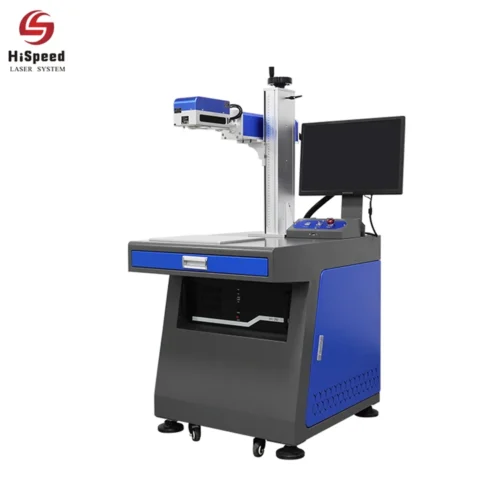
After that, shut off the laser machine and connect the rotary to its port. Often, 3D laser marking machines have a dedicated port for connecting this rotary. So, read the manufacturer’s instructions and properly secure the rotary, making sure it does not move.
Step 2: Secure the Curved Object
After securing the rotary attachments, it’s time to ensure your curved object is on the rotary. So, start by carefully placing the object on the rotary attachment. If you are using a roller-type rotary, make sure your curved object is evenly distributed between the rollers. However, for a chunky-type rotary, you have to place the object on the rotary and slightly tighten the chunk.
After placing and securing the object, slightly move it with your hand to see how it moves. If your objects are slippery or too small, you can use adjustable stands or cones. These small supports help maintain consistent rotation. Lastly, check that your workpiece does not wobble or roll down when moving.
Step 3: Laser & Software Settings
Once you have secured your curved object on the rotary, the next step is to set the laser and software. First, you have to enable rotary mode in your laser software. This will tell the laser machine that your object is curved rather than flat. It will also guide the laser on how to move so that the design wraps evenly around the served object.
Next, enter the correct diameter or circumference of the object into the software. This measurement helps ensure the design is sized accurately for the object. After the software settings, adjust the laser focus. So, focus the laser on the highest point of the curved surface.
Why? Because this is the point that will be visible during engraving. It will help you see where the engraving is going well or where something is missing. After that, adjust other parameters, such as the laser’s speed, power, and frequency. These parameters will determine how intense and fast the laser is and how many times it will hit the surface.
Step 4: Run a Test Engraving
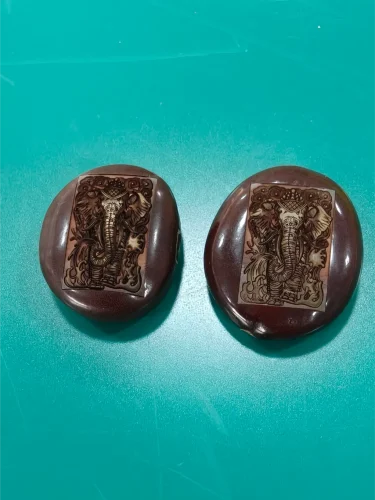
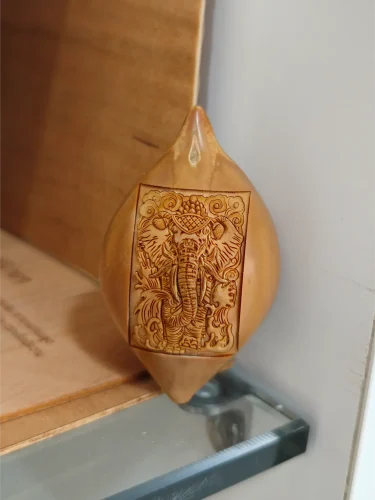

Before you start engraving your original workpiece, it is best to run a test. This test will help you see the engraving results and make any necessary adjustments. So, place your scrap curved piece of the same material in the laser machine.
Check if the engraving is sharp and readable. Also, make sure the design is not too shallow or too dark. If you notice any issues, you can still make laser adjustments at this point. For example, you can adjust the laser’s speed, focus, resolution, power, and frequency. This will prevent you from frustration, time-wasting, and material waste.
Step 5: Start the Engraving Process & Quality Check
After testing, the final step is actual engraving on the curved surface. So, first, place your curved workpiece on the rotary and secure it properly. Make sure that it does not wobble. After that, turn on the laser machine, and the rotary will begin rotating the curved object.
At the same time, the laser beam hits the rotating area of the object and starts engraving the desired design on the curved surface.
At this point, you can watch the engraving process without touching anything. After the engraving is complete, remove the workpiece with gloves and let it cool. Now, check the quality, such as sharpness and visibility of the design. If you feel anything is missing or want a darker, deeper design, you can run a light second pass.
Some Best Laser Settings for Curved Engraving: Beginner Guide
As you know, laser engraving a curved surface is somewhat tricky. Hence, all laser settings must be correct to avoid any mishaps. For experts, it might not be new; however, if you are a beginner, here are some laser settings you must know before you get started.
- Laser Power: Laser power determines how powerful a laser beam should be when it hits the curved surface. On a curved surface, too much power can damage the material, while too little can cause shallow engravings. So, it is best to keep the laser power at 20-30% for metal tumblers. However, for wood or leather, 40-60% laser power might work better.
- Laser Speed: Laser speed is how fast the laser moves over the curved object. A laser that is too fast or too slow will not give you the desired design results. So, if you are a beginner, start at 200-300 mm/min for a cylindrical surface.
- Resolution (DPI): DPI (dots per inch) determines the level of detail in your engraving. Usually, a higher DPI creates a very sharp, detailed design on a curved surface, but increases engraving time. So, as a beginner, you can start with 300-500 DPI for most curved objects
- Focus Height: The distance between the laser head and the object’s surface is known as the focus height. As I said above, on curved surfaces, the height changes as the object curves. Right? So, you have to focus the laser at the highest point of the curve. This will ensure the central part of your design remains sharp.
Frequently Asked Questions
Can you engrave a curved surface without a rotary attachment?
You can engrave a curved surface without a rotary attachment, but the design will not be accurate. Large or detailed designs may stretch or look uneven because the surface curves away from the laser.
Will engraving a curved surface damage my tumbler or bottle?
No, engraving a curved surface will not damage your tumbler if you use the correct laser settings. For example, keep the laser power and speed moderate and maintain proper focus.
Can I engrave colored or coated tumblers?
Yes, you can engrave colored or coated tumblers. However, you have to be very careful with laser settings. Too much power can burn, peel, or discolor the coating. Therefore, I recommend always starting with a lower power and running a test engraving.
Conclusion
Laser engraving is one of the most popular methods for creating custom designs on different objects. At first, engraving on curved surfaces is challenging. However, it is not as technical with the right tools. For example, engraving a curved surface needs a rotary attachment. This is the special equipment that is connected to the laser machine. The rotary rotates the curved object, and the laser strikes the surface accordingly, creating the desired design. In this article, I explain step by step how to engrave a curved surface and provide laser settings for the best results.